FPGA
Using the Colorlight 5A-75B board with ECP5 FPGA
last updated: 2025-01-07
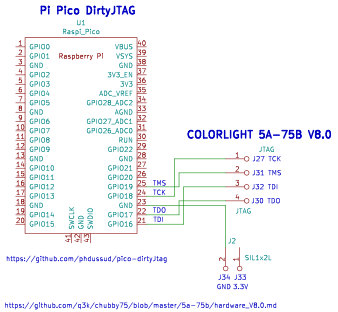
    sudo apt install python3-dev cmake libboost-python-dev libboost-filesystem-dev
    sudo apt install libboost-program-options-dev
    cd ~/fpga/git
    git clone --recursive https://github.com/YosysHQ/prjtrellis.git
    cd ~/fpga/git/prjtrellis/libtrellis
    cmake -DCMAKE_INSTALL_PREFIX=/usr/local .
    make
    sudo make install
    sudo apt install libboost-iostream-dev
    cd ~/fpga/git/nextpnr
    cmake . -DARCH=ecp5 -DTRELLIS_INSTALL_PREFIX=/usr/local
    make -j$(nproc)
    sudo make install
Yosys is a framework for Verilog RTL synthesis. Translates the Verilog code in a netlist for the FPGA. + Trellis:
Project Trellis provides the device database and tools for bitstream creation.. + nextpnr-ecp5:
Nextpnr is a portable FPGA place and route tool. It supports various architectures and is known for its good support of Gowin, Ice40 and ECP5 FPGAs. + openFPGALoader:
OpenFPGALoader is a universal utility for flashing FPGA boards.It aims to provide a standardised interface for flashing FPGAs from different manufacturers. ### A button and an LED For the first test we use the only input of the 5A-75B connected the button of the board. The button is pulled up to 3.3 V. We also use the user LED of the board connected to P11.
    cd fpga
    mkdir ecp5_5a75b
    cd ecp5_5a75b
    mkdir button_2_led
    cd button_2_led
    nano button_2_led.v
    module button_2_led (
        input      button_i,
        output     led_o
    );

    assign led_o = button_i;

    endmodule
nano button_2_led.v
    LOCATE COMP "led_o" SITE "T6";
    IOBUF PORT "led_o" IO_TYPE=LVCMOS33;
    LOCATE COMP "button_i" SITE "R7";
    cd ~/fpga/ecp5_5a75b/button_2_led
    yosys
    read_verilog button_2_led.v
    synth_ecp5 -json button_2_led.json
yosys -p "synth_ecp5 -json button_2_led.json" button_2_led.v
nextpnr-ecp5 --25k --package CABGA256 --speed 6 --json button_2_led.json --textcfg button_2_led_out.config --lpf button_2_led.lpf --freq 65
    ecppack button_2_led_out.config button_2_led.bit
    openFPGALoader -c dirtyJtag button_2_led.bit
openFPGALoader -c dirtyJtag button_2_led.bit -f --unprotect-flash
    cd ~/fpga/ecp5_5a75b/button_2_led
    nano Makefile
    # Target and top module names
    TARGET = button_2_led
    TOP = button_2_led

    # Source files
    OBJS = button_2_led.v

    # Path to Trellis
    TRELLIS = /usr/local/share/trellis

    # Default target
    all: ${TARGET}.bit

    # Synthesis step
    $(TARGET).json: $(OBJS)
            yosys -p "synth_ecp5 -top $(TOP) -json $@" $(OBJS)

    # Place and route step
    $(TARGET)_out.config: $(TARGET).json
            nextpnr-ecp5 --25k --package CABGA256 --speed 6 --json $< --textcfg $@ --lpf $>

    # Bitstream generation
    $(TARGET).bit: $(TARGET)_out.config
            ecppack --svf ${TARGET}.svf $< $@

    # SVF file generation (optional)
    ${TARGET}.svf: ${TARGET}.bit

    # Programming target
    prog: ${TARGET}.svf
            openFPGALoader -c dirtyJtag $(TARGET).bit

    # Clean target to remove generated files
    clean:
            rm -f ${TARGET}.json ${TARGET}_out.config ${TARGET}.bit ${TARGET}.svf

    .PHONY: all prog clean
make clean && make && make prog
    cd fpga/ecp5_5a75b
    mkdir blink_led
    cd blink_led
    nano blink_led.v
    module blink_led (
        input      clk_i,  // 25MHz clock input on P6
        output reg led_o   // LED output (P11)
    );

    // Parameters for counter
    localparam MAX_COUNT = 25_000_000 / 10;  // 0.1 second count for 25MHz clock
    localparam WIDTH = $clog2(MAX_COUNT);    // Width of the counter

    // Counter register
    reg [WIDTH-1:0] counter;

    // Always block for counter and LED control
    always @(posedge clk_i) begin
        if (counter == MAX_COUNT - 1) begin
            counter <= 0;       // Reset counter
            led_o <= ~led_o;    // Toggle LED
        end else begin
            counter <= counter + 1;  // Increment counter
        end
    end

    endmodule
    LOCATE COMP "led_o" SITE "C4";    # LED on Pin1 J1
    IOBUF PORT "led_o" IO_TYPE=LVCMOS33;
    LOCATE COMP "clk_i" SITE "P6";
    IOBUF PORT "clk_i" IO_TYPE=LVCMOS33;
    FREQUENCY PORT "clk_i" 25 MHz;
In the Makefile we change only the filenames.
Ok that's fun, so let's test the running light code from our Tang Nano board.
Running light
I have some old RGB LEDs and want to use all pins of the header J1 and the button for the reset. So I can have a running light with 14 LEDs :).
    module running_light (
        input sys_clk,          // in system clock
        input sys_rst_n,        // in reset active low
        output reg [13:0] led   // out 14 LEDS pin
    );

    localparam MAX_COUNT = 25_000_000 / 10;  // 0.1 second count for 25MHz clock

      reg [23:0] counter;

      always @(posedge sys_clk or negedge sys_rst_n)
      begin
        if (!sys_rst_n)
          counter <= 24'd0;
        else if (counter == MAX_COUNT)
          counter <= 24'd0;
        else
          counter <= counter + 1'b1;
      end

      always @(posedge sys_clk or negedge sys_rst_n)
      begin
        if (!sys_rst_n)
          led <= 14'b00000000000001;
        else if (counter == MAX_COUNT)
          led <= {led[12:0], led[13]};
      end
    endmodule
And the constraints file:
    LOCATE COMP "led[0]" SITE "C4";    # LED1  C4 pin1  J1
    LOCATE COMP "led[1]" SITE "D4";    # LED2  D4 pin2  J1
    LOCATE COMP "led[2]" SITE "E4";    # LED3  E3 pin3  J1
    LOCATE COMP "led[3]" SITE "D3";    # LED4  D3 pin5  J1
    LOCATE COMP "led[4]" SITE "F5";    # LED5  F5 pin6  J1
    LOCATE COMP "led[5]" SITE "E3";    # LED6  E3 pin7  J1
    LOCATE COMP "led[6]" SITE "N4";    # LED7  N4 pin8  J1-J8
    LOCATE COMP "led[7]" SITE "N5";    # LED8  N5 pin9  J1-J8
    LOCATE COMP "led[8]" SITE "N3";    # LED9  N3 pin10 J1-J8
    LOCATE COMP "led[9]" SITE "P3";    # LED10 P3 pin11 J1-J8
    LOCATE COMP "led[10]" SITE "P4";   # LED11 P4 pin12 J1-J8
    LOCATE COMP "led[11]" SITE "M3";   # LED12 M3 pin13 J1-J8
    LOCATE COMP "led[12]" SITE "N1";   # LED13 N1 pin14 J1-J8
    LOCATE COMP "led[13]" SITE "M4";   # LED14 M4 pin15 J1-J8
    IOBUF PORT "led" IO_TYPE=LVCMOS33;
    LOCATE COMP "sys_rst_n" SITE "R7"; # Reset input
    LOCATE COMP "sys_clk" SITE "P6";   # Clock input
    IOBUF PORT "sys_clk" IO_TYPE=LVCMOS33;
    FREQUENCY PORT "sys_clk" 25 MHz;
Running light with reset generator
In the article mentioned, I found some code for a reset generator rst_gen.v. So why this code? Let's ask Copilot:
This code is a reset generator module. It generates a reset signal (rst_o) based on the input clock (clk_i) and an external reset signal (rst_i). The purpose of this module is to ensure that the reset signal (rst_o) is asserted for a specific number of clock cycles after the external reset signal (rst_i) is deasserted. This can be useful in ensuring that all parts of the system are properly reset before normal operation begins.
The reset generator module (rst_gen) ensures that the system starts in a known state. Here's why this is important:
Initialization: When the FPGA or system powers up, all registers and flip-flops may have undefined values. The reset signal ensures that all parts of the system start from a known state.
Synchronization: The reset signal helps synchronize the start of the system. This is crucial for ensuring that all components begin operation simultaneously and correctly.
Stability: By holding the reset signal for a few clock cycles, the reset generator ensures that the system has enough time to stabilize before starting normal operation.
The reset generator ensures that the LED blinking starts correctly and predictably every time the system is reset or powered on.
Ok that's helpfull. I used also Copilot to add comments to the code and make minor changes. So here is the AI code :):
rst_gen.v
    module rst_gen (
      input     sys_clk,    // Clock input
      input     sys_rst_n,  // External reset input
      output reg    rst_gen // Generated reset output
    );

    /* try to generate a reset */
    reg [2:0]   rst_cpt;      // 3-bit counter for reset duration

    initial begin
        rst_cpt <= 3'b000;  // Initialize counter to 0
        rst_gen <= 1'b0;    // Initialize reset output to 0
    end

    always @(posedge sys_clk) begin
      if (sys_rst_n) begin
        rst_cpt <= 3'b000;  // Reset counter to 0 if external reset is active
        rst_gen <= 1'b1;    // Assert reset output
      end else begin
        if (rst_cpt == 3'b100) begin
          rst_cpt <= rst_cpt;  // Hold counter value when it reaches 4
          rst_gen <= 1'b0;     // Deassert reset output
        end else begin
          rst_cpt <= rst_cpt + 3'b001;  // Increment counter
          rst_gen <= 1'b1;              // Keep reset output asserted
        end
      end
    end

    endmodule
Now let's add this to our running light. For this we copy our files in a new directory (e.g. running_light_w_rst_gen) and add the rst_gen.v file. So now we have modules in two different Verilog files.
In the running light Verilog file we need to instantiate the reset generator module and change the reset variable:
running_light_w_rst_gen.v
    module running_light_w_rst_gen (
        input sys_clk,          // System clock input
        input sys_rst_n,        // Active low reset input
        output reg [13:0] led   // 14 LED outputs
    );

    localparam MAX_COUNT = 25_000_000 / 10;  // Adjust this value based on your clock frequency

    reg [23:0] counter;
    wire rst_gen;

    // Instantiate the reset generator
    rst_gen rst_inst (
        .sys_clk(sys_clk),
        .sys_rst_n(sys_rst_n),
        .rst_gen(rst_gen)
    );

    always @(posedge sys_clk or negedge rst_gen) begin
        if (!rst_gen)
            counter <= 24'd0;
        else if (counter == MAX_COUNT)
            counter <= 24'd0;
        else
            counter <= counter + 1'b1;
    end

    always @(posedge sys_clk or negedge rst_gen) begin
        if (!rst_gen)
            led <= 14'b00000000000001;
        else if (counter == MAX_COUNT)
            led <= {led[12:0], led[13]};
    end

    endmodule
In the make file we add the generator file:
Makefile
    # Target and top module names
    TARGET = running_light_w_rst_gen
    TOP = running_light_w_rst_gen

    # Source files
    OBJS = running_light_w_rst_gen.v rst_gen.v
    ...
RGB WS2812b driver
I have a flexible RGB matrix with 16x16 LED. The LEDs are addressable and use the WS2812b protocol. For this protocol it is important to have an accurate timing. This is easier to get with an FPGA as with a microcontroller. The code was generated with AI in the book of Jörg Rippel for the Ice40. Let's try it here.
    cd fpga/ecp5_5a75b
    mkdir rgb_matrix
    cd rgb_ws2812b_driver
    nano rgb_ws2812b_driver.v
rgb_ws2812b_driver.v
module WS2812B_Driver(
    input wire sys_clk,         // System clock at 25 MHz
    output reg data_out = 0     // Data output for WS2812B, initialised to 0
);

// Timing constants
parameter integer HIGH_1 = 90;        // 0.8µs High for "1"
parameter integer HIGH_0 = 45;        // 0.4µs High for "0"
parameter integer TOTAL_CYCLES = 125; // Total duration 1.25µs for "1" or "0"
parameter integer RESET_CYCLES = 8000; // 50µs for Reset

// Configuration parameters
parameter integer NUM_LEDS = 16*16; // Number of LEDs in the chain
parameter integer ANIMATION_SPEED = 30000000; // Speed of the animation

// Colour parameters
parameter [23:0] RED = 24'hFF0000;
parameter [23:0] GREEN = 24'h00FF00;
parameter [23:0] BLUE = 24'h0000FF;

// Colour data for LEDs
reg [23:0] color_data [0:NUM_LEDS-1]; // Array for colour data
reg [31:0] animation_counter = 0; // Counter for the animation speed

// Counting and control variables
reg [4:0] bit_index = 0; // Current bit
reg [6:0] cycle_count = 0; // Counts the clock cycles per bit
reg bit_value; // Current bit value
reg [13:0] reset_counter = 0; // Counter for reset interval
integer led_index = 0; // Current index in the LED chain
integer j; // Loop variable

always @(posedge sys_clk) begin
    if (animation_counter >= ANIMATION_SPEED) begin // 1 part state machine
        animation_counter <= 0;
        // Change LED colour of every LED
        for (j = 0; j < NUM_LEDS; j = j + 1) begin
            case (color_data[j])
                RED: color_data[j] <= GREEN; // red to green
                GREEN: color_data[j] <= BLUE; // green to blue
                BLUE: color_data[j] <= RED; // blue to red
                default: color_data[j] <= RED; // back to red
            endcase
        end
    end else begin
        animation_counter <= animation_counter + 1;
    end

    if (reset_counter >= RESET_CYCLES) begin // 2 part state machine
        // Reset interval waited, send colour data
        if (cycle_count < TOTAL_CYCLES) begin
            if (cycle_count == 0) bit_value = color_data[led_index][23 - bit_index];
            data_out <= (bit_value ? (cycle_count < HIGH_1) : (cycle_count < HIGH_0));
            cycle_count <= cycle_count + 1;
        end else begin
            cycle_count <= 0;
            bit_index <= bit_index + 1;
            if (bit_index == 23) begin
                bit_index <= 0;
                led_index <= led_index + 1;
                if (led_index == NUM_LEDS - 1) begin
                    led_index <= 0;
                    reset_counter <= 0; // Begin reset interval
                end
            end
        end
    end else begin
        // In reset interval
        data_out <= 0;
        reset_counter <= reset_counter + 1;
    end
end

endmodule
Interesting links
- https://github.com/q3k/chubby75/blob/master/5a-75b/hardware_V8.0.md
- https://github.com/phdussud/pico-dirtyJtag
- https://github.com/f4pga/prjtrellis
- https://github.com/Martoni/MartoniColorlight
