In this book, "pin" and "GPIO" have the same meaning. The pin numbers are GPIO numbers (0-28), not the hardware pin numbers 1-40 of the Pico board!
Books: The makers' approach to RISC-V
last updated: 2026-10-21
Work in progress; Coming soon!
Chapter 1: Beginning the journey
In this chapter we will learn how to toggle a GPIO pin on the Pico2 board. The classical "Hello World" for microcontroller.
-
First we install and program a Debug Probe using a second Pico2 board. This Probe is used to program (flash) the Pico2 with OpenOCD and also to step-debug our programs with GDB. We will adjust the
udev rulesso we don’t need to be root when working with our boards. -
Then we will install the RISC-V GCC tool chain, needed to assemble and link the program, to get a binary
.elfprogram that can be programmed. We also install OpenOCD. -
We create our Assembler program and linker script and program the chip (and look at the output :)).
-
We will explain every step in great detail.
Getting the hardware ready
As said in the preface we use a Linux computer with an Debian based Linux (Ubuntu, Kubuntu, Mint,…). If you have no Linux computer, you can use a virtual machine or even better a Raspberry Pi 5. The Raspberry Pi 5 is cheap, fast enough and well suited for educational purpose.
We will keep it simple. We need two Raspberry Pi Pico2. It is not that we fear to brick one of them (that could happen ;)) but we will use one of them as Debug Probe.
Naturally you can purchase a Debug Probe in a housing, but this will cost more.
The Debug Probe
We use the second Pico2 as Debug Probe. The Pico2 has an SWD (Serial Wire Debug) interface that makes the uploading of the program (flashing) and step by step debugging really easy.
The Debug probe has the following big advantages:
-
We don’t need to press a button to upload our code.
-
We can use GDB to debug our code on the hardware!
-
The Probe emulates an USB to Serial adapter for even more debugging.
Connecting the Probe
The Debug Probe Pico2 is connected with 3-6 cables to the Pico2 running our program (left side of the picture). If we bridge VSYS we only need only one USB cable connected to the Debug Probe.
NOTE
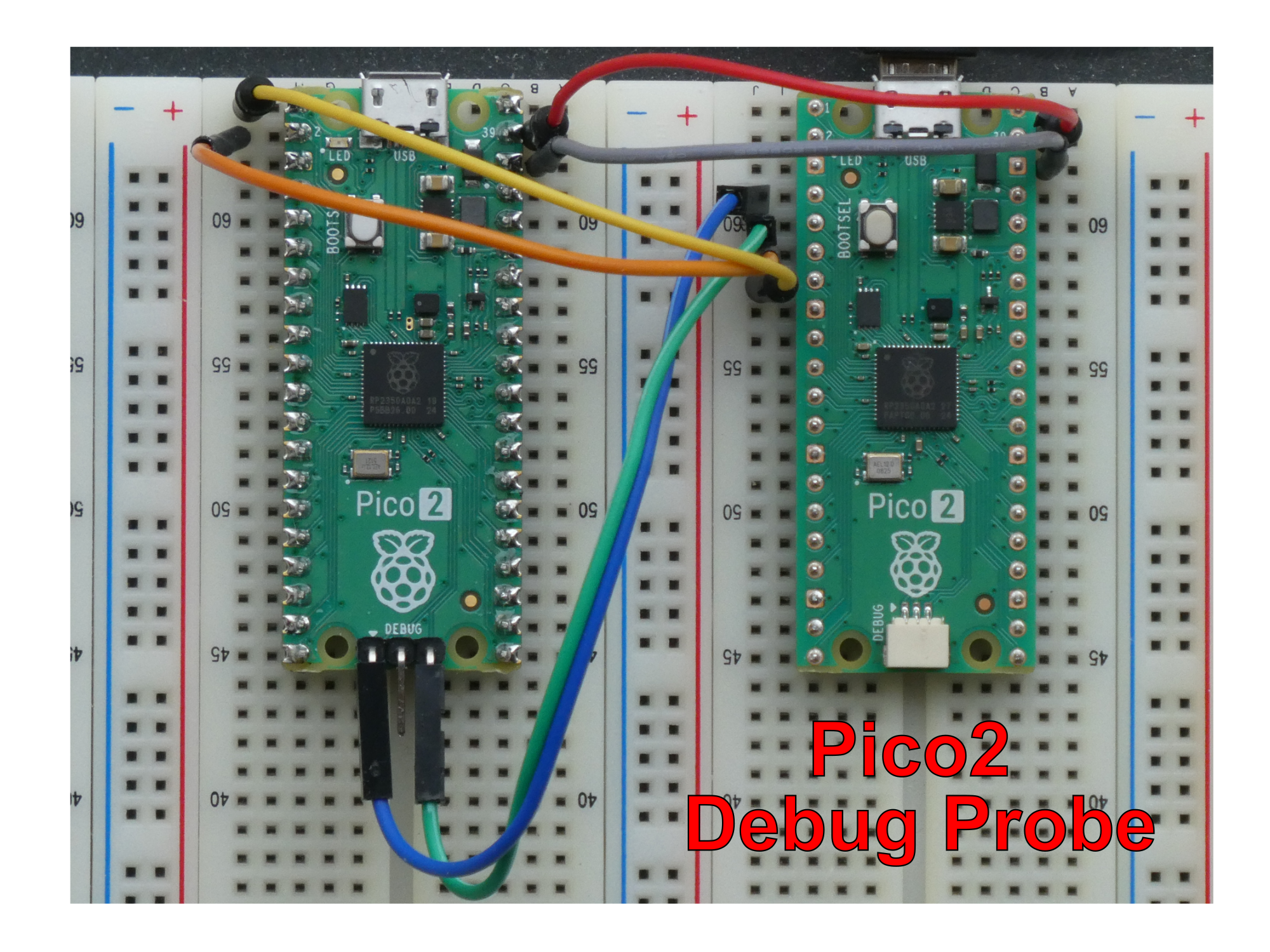
Figure 1. Debug probe connections
-
Obviously we need to connect ground
GND(grey). -
VSYS(pin 39, 5 V, red) is needed if we don’t use a second USB cable. -
For the
SWDinterface we connect GPIO2 (Debug Probe, blue) toSWCLK(Debug 1 on the right). -
For the
SWDinterface we connect GPIO3 (Debug Probe, green) toSWDIO(Debug 3 on the left). -
If we need the serial interface we connect GPIO4 (Debug Probe TX1, orange) to
RX0(GPIO0) and GPIO5 (Debug Probe RX1, yellow) toTX0(GPIO1).
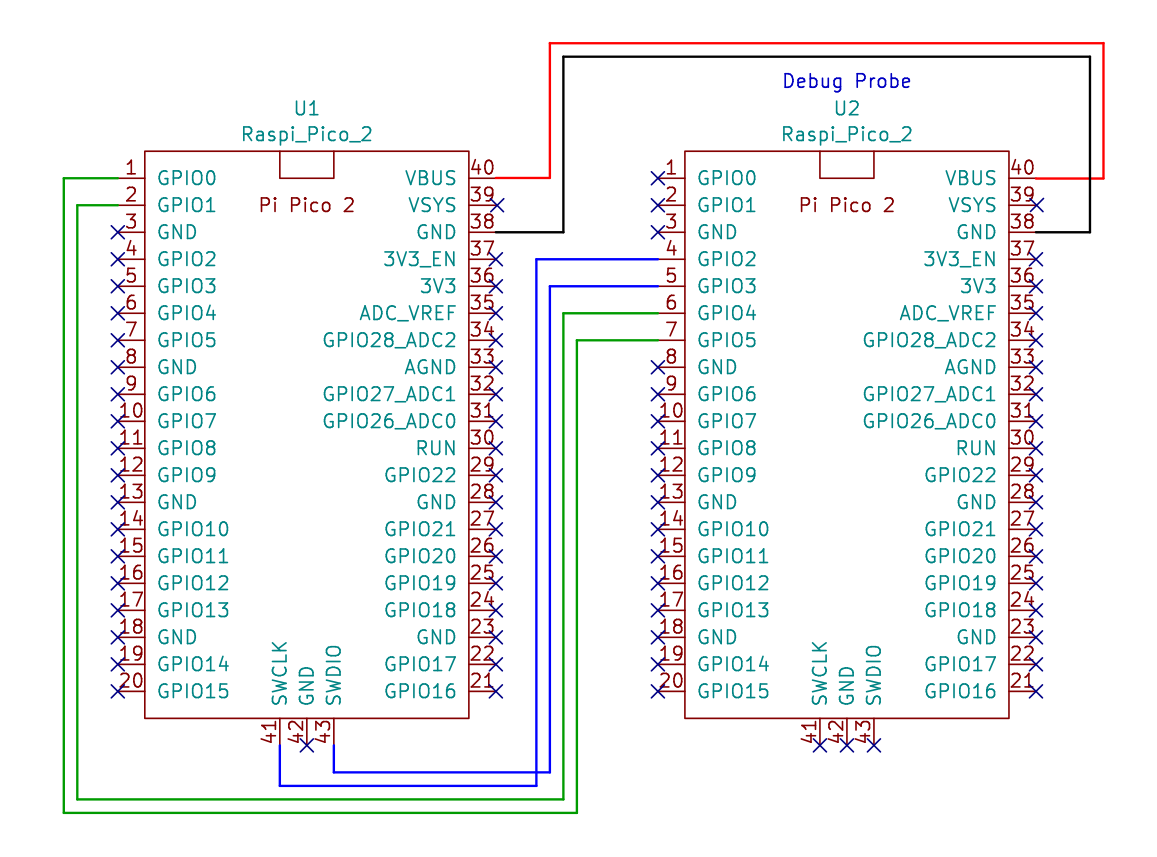
Figure 2. Debug probe circuit
In the circuit diagram the debug wires are blue and the serial wires green.
The Pico2 that we use here for the Debug Probe is a H version with already soldered headers. This version has a 3-pin JST-SH1.0 debug port connector instead of the normal 2,54 mm pins. So you need special small and fiddling cables. If you want to avoid extra costs, use the non H version and solder the headers by yourself.
Programming the Probe
To program the debug probe, we need to power it up with a pressed BOOTSEL button (white button on the PICO2). This mounts it as mass storage device on our PC. Then we download the debugprobe_on_pico2.uf2 file. To do so we go to the Raspberry Pi debugprobe GitHub page: https://github.com/raspberrypi/debugprobe and click on Releases and chose the newest debugprobe_on_pico2.uf2 file (I used v.2.3.1).
We copy this file it to the Pico2 in our file-manager.
Setting up the udev rules
We don’t want to be root to work with our devices, so we need to create an udev rule in /etc/udev/rules.d om our computer. Use the following commands in a terminal window:
cd /etc/udev/rules.d
sudo nano 14-all_pico.rules
Then copy the following lines to the 14-all_pico.rules file, save the file (Ctrl+s) and exit nano (Ctrl+x):
# Raspberry Pi Pico (RP2040) in BOOTSEL mode (for flashing)
SUBSYSTEM=="usb", ATTRS{idVendor}=="2e8a", ATTRS{idProduct}=="0003", MODE="0666", GROUP="plugdev", TAG+="uaccess"
# Raspberry Pi Pico in normal mode (serial port)
SUBSYSTEM=="tty", ATTRS{idVendor}=="2e8a", ATTRS{idProduct}=="000a", MODE="0666", GROUP="plugdev", TAG+="uaccess"
# Raspberry Pi Pico W (wireless)
SUBSYSTEM=="usb", ATTRS{idVendor}=="2e8a", ATTRS{idProduct}=="0005", MODE="0666", GROUP="plugdev", TAG+="uaccess"
SUBSYSTEM=="tty", ATTRS{idVendor}=="2e8a", ATTRS{idProduct}=="0005", MODE="0666", GROUP="plugdev", TAG+="uaccess"
# Raspberry Pi Pico 2 (RP2350)
SUBSYSTEM=="usb", ATTRS{idVendor}=="2e8a", ATTRS{idProduct}=="000c", MODE="0666", GROUP="plugdev", TAG+="uaccess"
SUBSYSTEM=="tty", ATTRS{idVendor}=="2e8a", ATTRS{idProduct}=="000c", MODE="0666", GROUP="plugdev", TAG+="uaccess"
# Raspberry Pi Pico 2 W (RP2350 + wireless)
SUBSYSTEM=="usb", ATTRS{idVendor}=="2e8a", ATTRS{idProduct}=="000d", MODE="0666", GROUP="plugdev", TAG+="uaccess"
SUBSYSTEM=="tty", ATTRS{idVendor}=="2e8a", ATTRS{idProduct}=="000d", MODE="0666", GROUP="plugdev", TAG+="uaccess"
# Raspberry Pi Pico Probe (CMSIS-DAP)
SUBSYSTEM=="usb", ATTRS{idVendor}=="2e8a", ATTRS{idProduct}=="0004", MODE="0666", GROUP="plugdev", TAG+="uaccess"
SUBSYSTEM=="tty", ATTRS{idVendor}=="2e8a", ATTRS{idProduct}=="0004", MODE="0666", GROUP="plugdev", TAG+="uaccess"
# Raspberry Pi Pico Probe (picotool/picoprobe, USB only)
SUBSYSTEM=="usb", ATTRS{idVendor}=="2e8a", ATTRS{idProduct}=="0009", MODE="0666", GROUP="plugdev", TAG+="uaccess"
# Raspberry Pi Debug Probe (USB only)
SUBSYSTEM=="usb", ATTRS{idVendor}=="2e8a", ATTRS{idProduct}=="000f", MODE="0666", GROUP="plugdev", TAG+="uaccess"
To reload the rules reboot or execute the following command:
sudo udevadm control --reload-rulesThe Pico2 (the workhorse)
Now to our Pico2 that will do all the work (left side of the picture).
If we buy a new Pico2 and we want to use OpenOCD to program it, OpenOCD can’t access the RISC-V cores. We need to program the chip first a program, that contains some special lines of code, that make the RISC-V cores accessible.
Power the Pico2 up with a pressed BOOTSEL button, to mount it as mass storage device on the PC. Go to the GitHub page of the book: https://github.com/weigu1/the_makers_approach_to_risc-v.
Then download the file named 01_toggle.uf2 (directory UF2_start_and_repair_files) and copy it to the Pico2.
If everything went well, the onboard LED should blink.
IMPORTANT
If you use a new Pico2 or your Pico2 is in an undefined state (can not be programmed), power it with a pressed BOOTSEL button and copy the the 01_toggle.uf2 file to it.
Installing the RISC-V toolchain
A toolchain is a set of distinct programming tools that are needed to create an executable program. The core components are the compiler (translates source code into machine code), the linker (combines machine code files into a single program) and the debugger (to find and fixes errors in the code).
We need a 32 bit toolchain for the RISC-V Hazard3 cores on the Raspberry Pi Pico 2 (RP2350).
We will use the GNU toolchain (https://en.wikipedia.org/wiki/GNU_toolchain).
One of the key components of that tool chain is the GNU Compiler Collection(GCC) (https://en.wikipedia.org/wiki/GNU_Compiler_Collection). We will refer to it as GCC in this document. It contains the preprocessor, the linker and the GNU Assembler (https://en.wikipedia.org/wiki/GNU_Assembler).

Figure 3. GCC
The ISA (Instruction Set Architecture) supported by Hazard3 is rv32imac+. The easiest way is to use a pre-built toolchain for this ISA. We find the toolchain for PC (x86) and the Raspberry Pi in the pico-sdk-tools GitHub page:
Click on releases (right side of the page) for the newest tools I used v2.3.0-1.
First we create an own directory in our home folder. You can use the following commands in a terminal:
mkdir -p ~/pi_pico2/riscv_gcc/2.3.0-1
cd ~/pi_pico2/riscv_gcc/2.3.0-1
If you use a PC download the riscv-toolchain with x86_64 in the name and uncompress it:
wget https://github.com/raspberrypi/pico-sdk-tools/releases/download/v2.3.0-1/riscv-toolchain-16-x86_64-lin.tar.gz
tar -xzf riscv-toolchain-16-x86_64-lin.tar.gz
For the Raspberry Pi use riscv-toolchain with aarch64 in the name and uncompress it:
wget https://github.com/raspberrypi/pico-sdk-tools/releases/download/v2.3.0-1/riscv-toolchain-16-aarch64-lin.tar.gz
tar -xzf riscv-toolchain-16-aarch64-lin.tar.gz
After this we find all the executable files of the toolchain in a new bin-directory in the riscv_gcc/2.3.0-1 folder.
This directory must be added to the standard environment variable PATH, so we can access the executable files from everywhere. To make this permanently we open the hidden .bashrc file in our home folder with an editor.
nano ~/.bashrcWe scroll to the end of the file and add the following two lines:
export PATH="$PATH:$HOME/pi_pico2/riscv_gcc/2.3.0-1/bin"
export PATH="$PATH:$HOME/pi_pico2/riscv_gcc/2.3.0-1"
and we save with Ctrl+s and leave with Ctrl+x.
Close the terminal, open a new terminal for the path to take effect and test the Assembler with:
riscv32-pico-elf-as --versionInstalling OpenOCD
We need OpenOCD, the Open On-Chip Debugger, to program and to debug the RP2350. So let’s install it:
mkdir -p ~/pi_pico2/openocd
cd ~/pi_pico2/openocd
For a PC download OpenOCD with x86_64 in the name and uncompress it:
wget https://github.com/raspberrypi/pico-sdk-tools/releases/download/v2.3.0-1/openocd-0.12.0+dev-x86_64-lin.tar.gz
tar -xzf openocd-0.12.0+dev-x86_64-lin.tar.gz
For the Raspberry Pi download OpenOCD with aarch64 in the name and uncompress it:
wget https://github.com/raspberrypi/pico-sdk-tools/releases/download/v2.3.0-1/openocd-0.12.0+dev-aarch64-lin.tar.gz
tar -xzf openocd-0.12.0+dev-aarch64-lin.tar.gz
We need to add again the new directory to our PATH, so we can access the files from everywhere.
nano ~/.bashrcAdd the following line to your ~/.bashrc file:
export PATH="$PATH:$HOME/pi_pico2/openocd"Close the terminal, open a new terminal for the path to take effect and test OpenOCD with:
openocd --versionOn some distros libhidapi-hidraw0 is missing. If you get an error install it with:
sudo apt install libhidapi-hidraw0Let’s toggle a GPIO output (RISC-V)
The Assembly code
Let’s try with our own minimal code. The code should allow to easily change the pin and it should toggle the GPIO as fast as possible :). Explanations will follow after the fun part.
### Toggle a GPIO pin (minimal version)
### 01_toggle.S
### weigu.lu

        ### RP2350 Image Definition Block
        # This block is required for the RP2350 to recognize the binary as a valid
        # RISC-V executable. It must appear within the first 4 KB of the image.
        # RP2350 datasheet: 5.9.1. Blocks and block loops
        # 5.9.3. Image definition items, 5.9.3.4. ENTRY_POINT item
        .balign 8        # Align to 8-byte boundary (required for RP2350 image header)
        .word 0xffffded3 # Header magic number (identifies the image)
        .word 0x11010142 # Item 0 flags: 0b0001 0001 0000 0001 0000 0100 0010
                         # IMAGE_TYPE_EXE, EXE_SECURITY_UNSPECIFIED,
                         # EXE_CPU_RISC,  EXE_CHIP_RP2350
        .word 0x00000344 # Item 1: Block size = 3,
                         # Block type = PICOBIN_BLOCK_ITEM_1BS_ENTRY_POINT
        .word _start     # Item 2: Initial PC (runtime) address (aka entry point)
        .word __stack_top # Item 3: Initial SP address (aka stack pointer)
        .word 0x000004ff # Item 4: Optional SP limit address (aka stack limit)
        .word 0x00000000 # Link: Single block loop has 0 items
        .word 0xab123579 # Footer magic number

         ### Global constants
        .equ PIN_OUT,         15            # Pin (GPIO) nr to use (25 for LED, Pico2)
        .equ DELAY_NR,        1000000       # 1000000 gives us ~ 2 Hz (12MHz clock)

        ### Bits, Masks and Offsets
        .equ GPIO_OFFSET,     PIN_OUT*8+4   # Offset for GPIO reg. (0=Status, +4=Ctrl)
        .equ PADS_OFFSET,     PIN_OUT*4+4   # Offset for PAD reg. (GPIO0 starts w. +4)
        .equ A_CLR,           0x3000        # Atomic offset bitmask AND (clr) on write
        .equ GPIO_CTRL_FUNCT_SIO, 0x05      # Function 5 SIO_0
        .equ PAD_ISO_BIT,     0x08          # Bit 8 = Pad Isolation control

        ### Memory-Mapped Register Definitions
        .equ IO_BANK0_BASE,   0x40028000    # IO Bank0 Base Address
        .equ SIO_BASE,        0xd0000000    # SIO (Single-Cycle I/O) Base Address
        .equ PADS_BANK0_BASE, 0x40038000    # User Bank Pad Control register base
        .equ GPIO_CTRL,       IO_BANK0_BASE + GPIO_OFFSET # GPIO_CTRL reg. (for Mux)
        .equ GPIO_OUT_XOR,    SIO_BASE + 0x28 # GPIO output XOR register (atomic)
        .equ GPIO_OE_SET,     SIO_BASE + 0x38 # GPIO output enable reg. (atomic set)
        .equ PAD_CLR,         PADS_BANK0_BASE + PADS_OFFSET + A_CLR # PAD CLR

        .section .text              # Code section
        .global _start              # Makes the symbol '_start' visible to the linker

### Entry Point: _start
_start:         la sp, __stack_top  # Load the stack pointer with the top of the stack
                call main           # Call the main function
                wfi                 # Wait for interrupt (save power if CPU idle)
                j _start            # Safeguard if main returns (should never happen)

### Main Function
        .section .text              # Code section
        .global main                # Make 'main' visible to the linker
main:           ### SETUP
setup:          # Tell the multiplexer to set our Pinx to GPIOx
                li t0, GPIO_CTRL    # Load the address of the GPIO_CTRL reg.
                lw t1, 0(t0)        # Load current value of the GPIO_CTRL reg.
                andi t1, t1, ~0x1f  # Clear the lower 5 bits (function select)
                ori t1, t1, GPIO_CTRL_FUNCT_SIO # Set the funct. select to SIO (GPIO)
                sw t1, 0(t0)        # Store updated value back to the GPIO_CTRL reg.

                # Set GPIOx as an output
                li t0, GPIO_OE_SET  # Load address of atomic GPIO out enable set reg.
                li t1, 1 << PIN_OUT # Load the bitmask for the used GPIO
                sw t1, 0(t0)        # Store updated value back to the register

                # Clear Pad Isolation for GPIOx
                li t0, PAD_CLR      # Load the address of the pad register
                li t1, 1 << PAD_ISO_BIT # Clear pad for the used GPIO
                sw t1, 0(t0)        # Store updated value back to the register

                # Prepare toggle mask for GPIOx
                li t0, GPIO_OUT_XOR # Load the address of the GPIO_OUT_XOR
                li t1, 1 << PIN_OUT # Load the bit for the output GPIO to be toggled

mainloop:       ### MAIN LOOP: Toggle output GPIOx
                sw t1, 0(t0)        # Toggle bit (atomic XOR bit setting-writing)
                # uncomment both lines if you use the onboard LED
                #li a0, DELAY_NR    # Set counter for delay loop (parameter a0)
                #jal delay          # Jump and link delay
                j mainloop          # Jump mainloop forever

delay:          # Subroutine delay (parameter a0)
                addi a0, a0, -1     # Decrement a0
                bnez a0, delay      # Stay in loop until counter = 0
                ret
Create a directory for the first program and create the assembler file with:
mkdir -p ~/pi_pico2/pico2_riscv_ass/01_toggle
cd ~/pi_pico2/pico2_riscv_ass/01_toggle
nano 01_toggle.S
Copy and paste the code into the file and save it (Ctrl+s, Ctrl+x).
We use .S extension for assembly files and not .s or .asm. .S files have the GCC preprocessor run on them (.s files do not).
The Linker script
Next we create a minimal linker script:
/* Minimal linker script for RISC-V multi-core by weigu.lu */
OUTPUT_ARCH(riscv)
ENTRY(_start)

MEMORY {
    FLASH (rx)  : ORIGIN = 0x10000000, LENGTH = 4M    /* FLASH read-only */
    RAM   (rwx) : ORIGIN = 0x20000000, LENGTH = 512k  /* SRAM read/write */
}

/* Sections */
SECTIONS {
    .text : ALIGN(4) {
        *(.text*)
    } > FLASH
    .rodata : ALIGN(4) {
        *(.rodata*)
    } > FLASH
    .data : ALIGN(4) {
        *(.data*)
    } > RAM AT > FLASH
    .bss : ALIGN(4) {
        *(.bss*)
    } > RAM
}

/* RAM boundaries */
__stack_top = ORIGIN(RAM) + LENGTH(RAM);
We create a text file in a terminal called linker_min.ld in our pico2_riscv_ass directory with:
cd ~/pi_pico2/pico2_riscv_ass
nano linker_min.ld
Copy and paste the script code and save the file (Ctrl+s, Ctrl+x).
Creating the binary file and programming it using OpenOCD
To create a binary file we first use the GCC Assembler and then the gcc linker.
cd ~/pi_pico2/pico2_riscv_ass
riscv32-pico-elf-as -g -march=rv32imac -mabi=ilp32 -o 01_toggle/01_toggle.o 01_toggle/01_toggle.S
riscv32-pico-elf-ld -g -m elf32lriscv -T linker_min.ld -o 01_toggle/01_toggle.elf 01_toggle/01_toggle.o
If take a look at the 01_toggle folder we see that the assembler created an object file (01_toggle.o) and the linker created the binary file (01_toggle.elf).
Now we use OpenOCD to program the Pico2 through our Debug Probe with the following instruction:
cd ~/pi_pico2/pico2_riscv_ass
openocd -f interface/cmsis-dap.cfg -f target/rp2350-riscv.cfg -c "adapter speed 5000" -c "program 01_toggle/01_toggle.elf verify reset exit"
YES! Now let’s look at our output by using an oscilloscope. We used GPIO15:

Figure 4. Oscilloscop screen of GPIO output (01_toggle.S)
It works but the frequency is weird. Ok we will look at this later.
If you have no oscilloscope, you can uncomment the two lines in mainloop, that call a delay subroutine, and connect an LED with series resistor to the toggle pin GPIO15. If you have a normal Pico2 (no W) you can use instead the onboard LED. Do do so change the pin number (PIN_OUT) to 25 for the onboard LED of the Pico2. Save this file as 01_toggle_LED.S in a 01_toggle_LED folder. Use the 3 commands from above with changed folder and file names and test the onboard LED.
Analyzing the source code
The source code is a plain text file with the ending .asm, .s (no C preprocessor) or .S (using C preprocessor).
The C preprocessor runs first and performs textual substitutions on the source code before passing it to the Assembler. As we use the GCC Assembler and will soon need the preprocessor to tidy up, our files will have always big .S as ending.
There are no rules how to format the text file, but I will use 4 different columns and a tabulator with a tab size of 8 character.
-
Labels (1 column):
Labels mark addresses for jumps, data fields or strings. They should be explicit and end with a colon. Special labels begin with an underscore. -
Assembler directives (2 column):
Assembler directives start always with a dot (.). They are also called pseudo-opcodes and are instructions for the Assembler (no executable code instructions) that help with the assembly process. They define e.g. constants (.equ), reserve memory space for variables (.word), or set the program origin (.section .text). -
Op-codes (3 column):
Executable instructions in Assembler. -
Comments (4 column):
They start with the number sign#(this can be confusing in combination with the C preprocessor (e.g. #define)). For comments over more lines we can also use/* comment */like inC.
Always use comments! They should be short and meaningful and should describe a code block. Comments are very important for yourself to help remember what you did. We are all forgetful and after one or two month or year it will be difficult to read your own code without comments.
Directives, Sections, Data types and Definitions
There are 5 section directives: .text,.data, .rodata, .bss and .noinit.
In GCC we explicitly need to precede the needed section directive with the directive .section.
-
.section.text: Code section! Here we find instructions of our program (assembler opcodes). Resides in Flash. -
.section.data: Address of data that needs to be written or read (must be copied to SRAM). -
.section.rodata: Read Only data (Flash). -
.section.bss: (block started symbol) uninitialized variables in SRAM (must be zeroed at startup). -
.section.noinit: Stores variables that must retain their value across warm resets without being zeroed (SRAM).
For data we can precise which data we use with a data type directive:
-
asciizor.ascii: Strings with quotation marks with or without NULL-byte -
.byte,.hword,.word,.dword: 8, 16, 32, 64 bit -
.byte,.2byte,.4byte,.8byte: same as above but clearer -
.space: Reserves a number of bytes
Data types are often preceded by a label. The data itself is separated by commas.
For the start of our program we find:
        .section .text              # Code section
        .global _start              # Makes the symbol '_start' visible to the linker
The .global directive makes the special label (address) _start globally visible for the linker.
For Definitions we will use .equ (GCC). GCC needs a comma after the symbol and can even do calculations:
        .equ PIN_OUT, 15
        .equ GPIO_OFFSET,     PIN_OUT*8+4   # Offset for GPIO reg. (0=Status, +4=Ctrl)
As we see we can also use calculations that are done from GCC before the definition.
You find a list with Assembler directives in the riscv-asm-manual: https://github.com/riscv-non-isa/riscv-asm-manual/blob/main/src/asm-manual.adoc
The weird block
We want to use a RISC-V core. A block of 32 bytes (8 words) tells the chip what core to use. In the Raspberry Pi pico-sdk, the explicit block is called the picobin image header. Here is the block with some comments:
        ### RP2350 Image Definition Block
        # This block is required for the RP2350 to recognize the binary as a valid
        # RISC-V executable. It must appear within the first 4 KB of the image.
        # RP2350 datasheet: 5.9.1. Blocks and block loops
        # 5.9.3. Image definition items, 5.9.3.4. ENTRY_POINT item
        .balign 8        # Align to 8-byte boundary (required for RP2350 image header)
        .word 0xffffded3 # Header magic number (identifies the image)
        .word 0x11010142 # Item 0 flags: 0b0001 0001 0000 0001 0000 0100 0010
                         # IMAGE_TYPE_EXE, EXE_SECURITY_UNSPECIFIED,
                         # EXE_CPU_RISC,  EXE_CHIP_RP2350
        .word 0x00000344 # Item 1: Block size = 3,
                         # Block type = PICOBIN_BLOCK_ITEM_1BS_ENTRY_POINT
        .word _start     # Item 2: Initial PC (runtime) address (aka entry point)
        .word __stack_top # Item 3: Initial SP address (aka stack pointer)
        .word 0x000004ff # Item 4: Optional SP limit address (aka stack limit)
        .word 0x00000000 # Link: Single block loop has 0 items
        .word 0xab123579 # Footer magic number
NOTE
A microcontroller sees zeros and ones (voltage, no voltage). If we note a 32 bit address or number in binary that looks like this: 0b10101011000100100011010101111001 (the preceding 0b stands for binary notation). That is nor readable! Let’s group to nibbles (half bytes):
0b1010_1011_0001_0010_0011_0101_0111_1001.
Only a little better.
We need to recognize every bit because a lot in bare metal programming is about bit manipulation. The decimal notation 2870097273(10) would not help.
A group of 4 bits can represent the numbers from 0(10)-15(10) in decimal. So at the beginning of the computer age the hexadecimal (hex for short) positional numeral system for representing a numeric value as base 16 was seen fit for humans to represent the binary system. A digit is represented as 0x0 to 0x9 like in the decimal system and as a letter of the alphabet from 0xa to 0xf (either upper or lower case) for the digits with decimal values 10 to 15 (the preceding 0x stands for hexadecimal notation).
So our number from above in hexadecimal is: ab123579(16) or 0xab123579 in Assembler.
Don’t worry, after a while you will see the bits in an hex digit without thinking. We will use lower case letter in this book.
| Binary | Hex | Decimal | Binary | Hex | Decimal |
|---|---|---|---|---|---|
|
|
0 |
|
|
8 |
|
|
1 |
|
|
9 |
|
|
2 |
|
|
10 |
|
|
3 |
|
|
11 |
|
|
4 |
|
|
12 |
|
|
5 |
|
|
13 |
|
|
6 |
|
|
14 |
|
|
7 |
|
|
15 |
Our Entry point "_start"
The linker needs an address to know where we start. This is an external scope program identifier and is preceded with an underscore to distinguish it from normal Assembler labels.
### Entry Point: _start
_start:         la sp, __stack_top  # Load the stack pointer with the top of the stack
                call main           # Call the main function
                wfi                 # Wait for interrupt (save power if CPU idle)
                j _start            # Safeguard if main returns (should never happen)
As we want to use sub-programs, we need to initialize the stack pointer at the top of the memory (more about the stack in the chapter 10 Memory and DMA). Then we call our main program. The next two instructions are a fall-back and should never be reached.
OK now is the right time to talk about the RISC-V ABI (Application Binary Interface). It defines how software components interact at the binary level, including register usage, stack organization, function calling conventions, and data alignment.
If you want to take a look to the ABI specs, search the net for riscv-abi-2.pdf.
Let’s start here with the register usage, and as we continue we will also learn more and more assembler instructions used.
The RISC-V ABI Register conventions
We have 32 register (x0-x31). As we use RISC-V 32 the register have all a length of 4 byte (32 bit). They are all quite equal with one register that is more equal :). Register x0 has a fixed value of zero (hard-wired) and can’t be used as multi-purposed register (3.8.1.3.1. Register conventions).
To avoid chaos the ABI gives a guideline how to use the register and it is preferable to stick to these guidelines. Here is the overview:
| Register | ABI Name | Role | Saver |
|---|---|---|---|
|
|
Hardwired to zero; ignores writes |
- |
|
|
Return address (link register) |
Caller |
|
|
Stack pointer |
Callee |
|
|
Global pointer |
- |
|
|
Thread pointer |
- |
|
|
Temporaries |
Caller |
|
|
Saved register or frame pointer |
Callee |
|
|
Saved register |
Callee |
|
|
Function arguments and return values |
Caller |
|
|
Function arguments |
Caller |
|
|
Saved registers |
Callee |
|
|
Temporaries |
Caller |
Let’s sum up:
-
5 special registers:
zero,ra,sp,gpandtp. -
8 argument registers:
a0-a7. We will use this register to pass and return arguments from subroutines (and in this book as temporary register inside subroutines). -
7 temporary registers
t0-t6to play with. -
12 saved registers. Saved means that they will not been affected in subroutines (we, ourselves and I need to prevent this, there is no automatism).
Saver - Caller:
If a subroutine (the caller) wants to use one of these registers (ra, t0-t6, a0-a7) after calling another function, it must save the value itself, normally to the stack, before making the call. The called function (the callee) is allowed to overwrite these registers without warning.
Saver - Callee:
If a subroutine (the callee) wants to use one of these registers (sp, s0-s11), it must save the original value when it starts and restore it before returning.
The caller can assume these registers will not change after the function call.
| Instr. | Op code meaning | Format | Function | Example | Ext. |
|---|---|---|---|---|---|
|
Load label Addr. (p) |
|
rd ← addr |
|
I |
|
CALL subrout. (p) |
|
ra = pc+4; pc = addr |
|
I |
|
Wait For Interrupt |
|
Pause execution until interrupt |
|
Priv |
|
Jump (p) |
|
pc ← addr |
|
I |
Explanations and remarks:
-
A lot of the instructions we use are pseudo-instructions (p). Pseudo-instructions are not real RISC-V instructions, but the Assembler converts them into real instructions before the code runs. They make the code easier to write and read, hide complexity, sometimes save space and provide a familiar syntax.
-
The instruction
lais a pseudo-instruction and loads the memory address of a label into a register. A label is not a constant, so don’t useli(load immediate) if you load an address! -
The instruction
callis also a pseudo-instruction to call subroutines far from the current position. Normally we usejal(jump and link) if the jump offset is less than ±1 MiB away. Thecallinstruction automatically saves the return address (address of the following instruction) to the registerra. The ±offset is calculated by the Assembler from the label and the momentary position (PCProgram Counter register). -
Microcontroller programs end normally in an endless loop! So we are not returning from
call main. The two instructions after the call should never be reached. -
The instruction
wfipauses execution until the processor is interrupted, or enters Debug mode. If something goes wrong, this should save power. -
The instruction
jis a pseudo-instruction for an unconditional jump that the Assembler translates into ajal zero, offset(jump and link). It changes the program counter (PC) to a new location (without saving the return address). The offset is calculated by the Assembler. The jump here to_startis for failsafe and should never be reached.
Flowchart overview
Before we start, let’s get an overview using a flowchart. In the first chapters of this book I will use some flowcharts to get a clearer overview of the code. Later on they are less necessary, because our habit of reading code will grow.
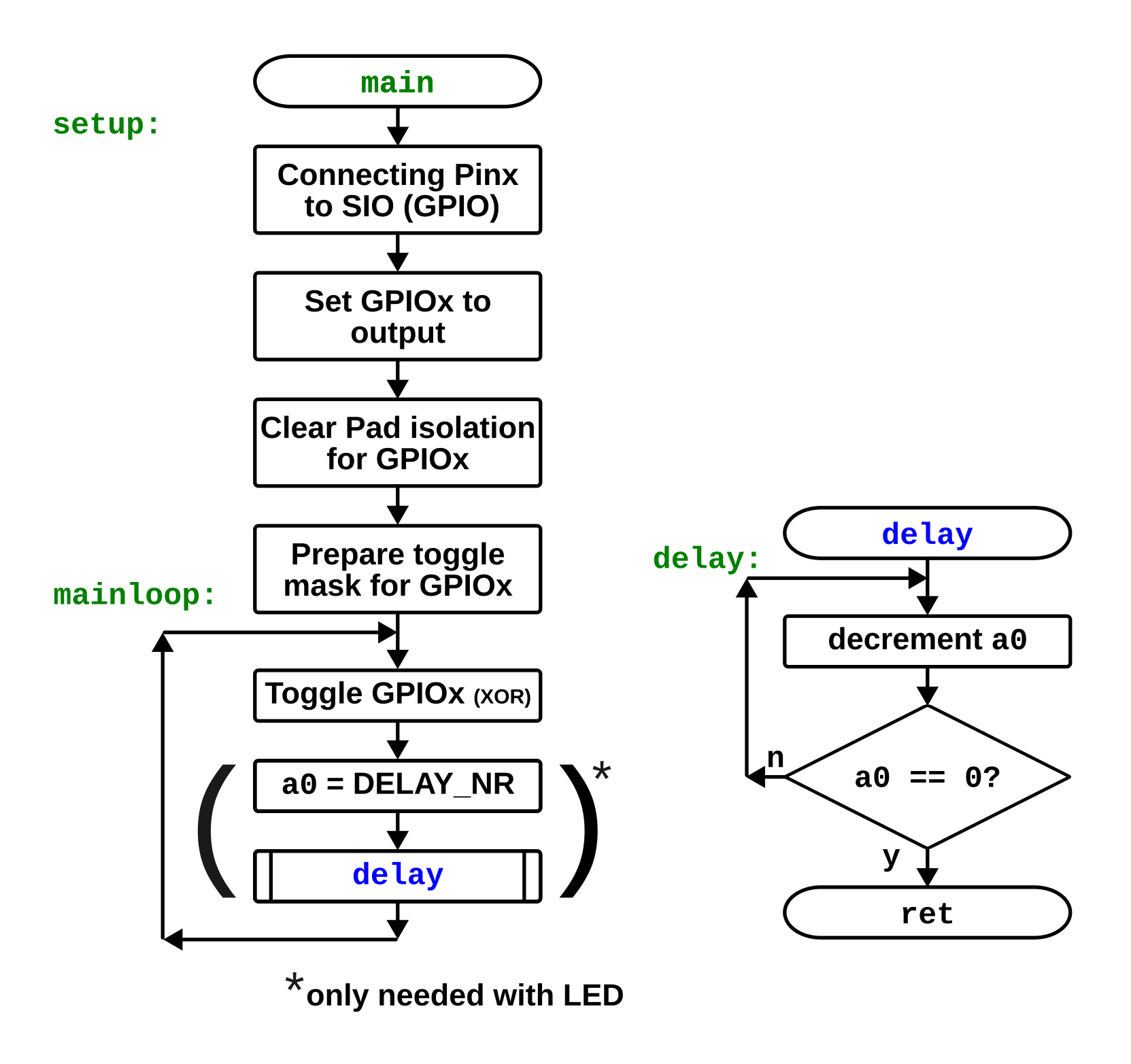
Figure 5. Flowchart overview (01_toggle.S)
Setting up a GPIO pin in the "setup" part
Most microcontroller programs have a setup part that is running only once to set up things and a mainloop that never ends. We use a label called mainloop to separate this two parts.
To use a GPIO for digital I/O operations we need to configure some register. This is the price to pay for the flexibility of modern microcontroller pins.
If we look at the RP2350 bus fabric overview we see that we have a high speed bus AHB5 and a low speed bus called APB. It gives access to system control registers and lower-bandwidth peripherals.
But for our GPIO pins we have a separated Single-cycle IO subsystem called SIO (left side) that is directly connected to the high speed bus. The SIO peripherals are accessed via a dedicated path from each core.
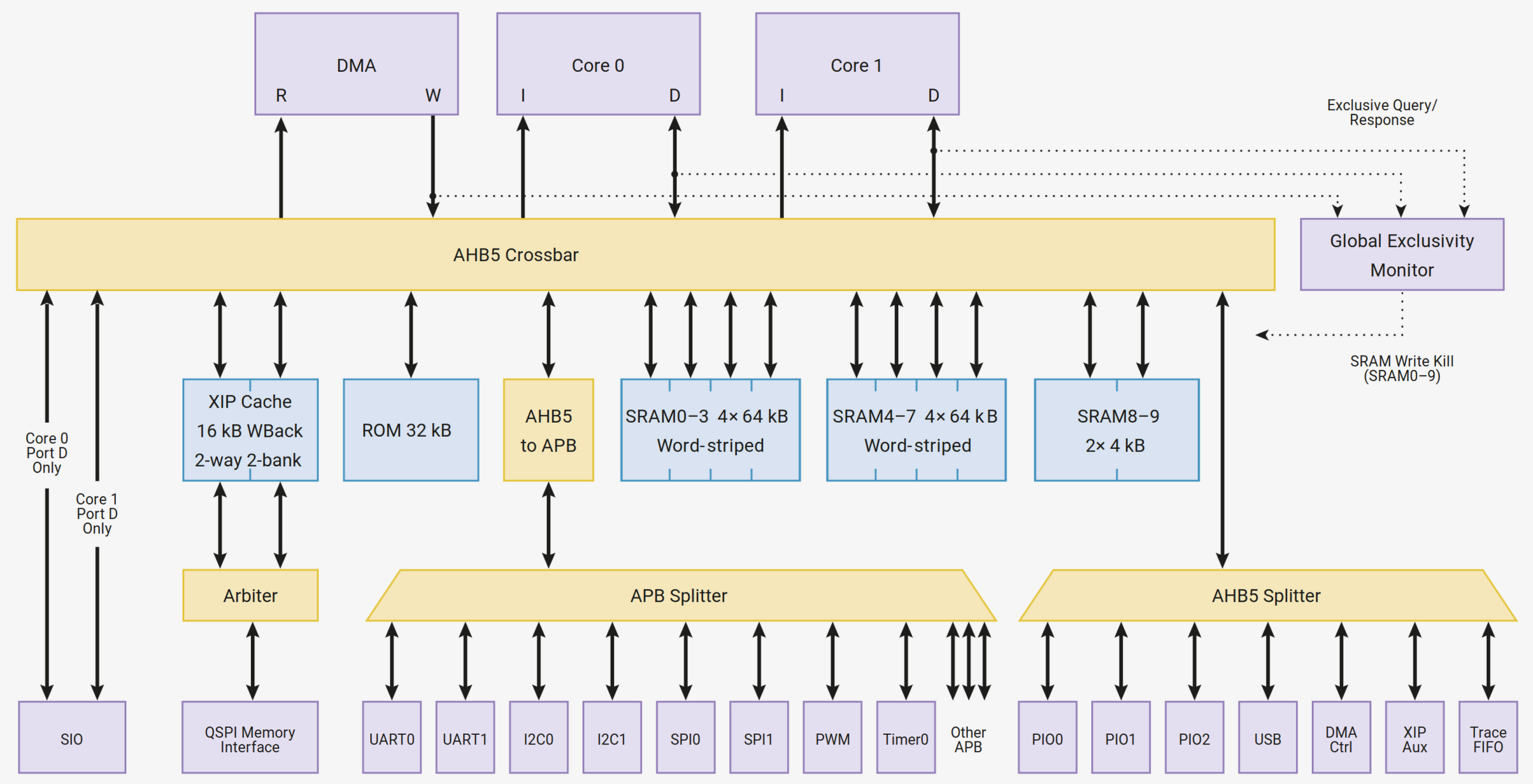
Figure 6. Bus fabric (datasheet figure 5)
Connecting Pinx to SIO
Every pin can have different functions like SPIx, UARTx, I2Cx, SIO etc. There is a big table with all these assignments in the datasheet (table 645. General Purpose Input/Output(GPIO) Bank 0 Functions). Take a look at this table! We will need it more than once.
We need here to connect our pin to the SIO subsystem function nr 5 that handles all user GPIOs (1.2.3. GPIO functions (Bank 0), 3.1.3. GPIO control, 9.4. Function select).
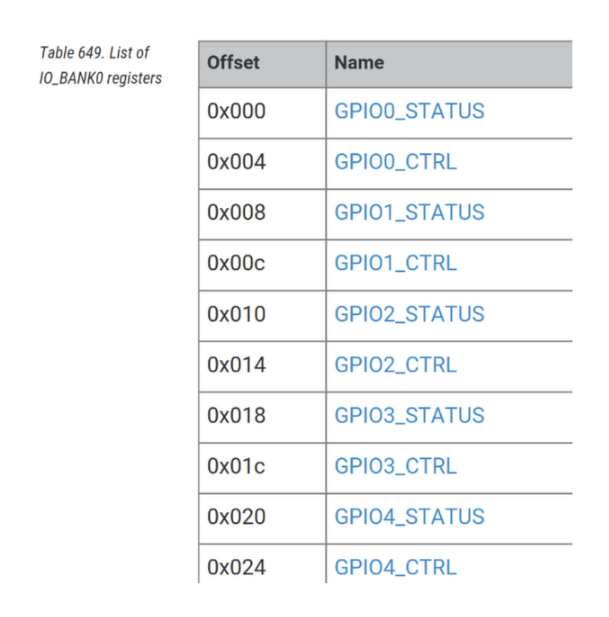
Figure 7. Excerpt of the list of IO_BANK_0 register (datasheet)
GPIO functions are on User Bank 0. The User Bank IO registers start at a base address of 0x40028000 defined as IO_BANK0_BASE (9.11.1. IO - User Bank). To multiplex our output pin to the GPIO function we need the GPIO_CTRL register at address 0x4002807c. It is no good idea to use absolute addresses, so we need an offset of 0x07c to the base address. To make our program flexible we let the Assembler calculate the offset!
We see that the offset increments by four for each register. We have a Status- and a Ctrl-Register per GPIO pin, so the formula for the offset is:
GPIO_OFFSET = GPIO_number * 8 + 4
E.g. for GPIO number 15 we get an offset of: 15*8+4 = 124 = 0x7c.
TASK:
Write 0x05 (function 5 to connect the pin with the SIO subsystem) to the GPIO_CTRL register corresponding to our pin (e.g. GPIO15_CTRL).
For this 5 bit (4:0) are provided in the register. We use masking with AND to clear bits and masking with OR to set bits. So other bits in the register than the lower 5 bits are not changed.
        .equ PIN_OUT,         15            # Pin (GPIO) nr to use (25 for LED, Pico2)
        .equ GPIO_OFFSET,     PIN_OUT*8+4   # Offset for GPIOx reg. (0=Status, +4=Ctrl)
        .equ GPIO_CTRL_FUNCT_SIO, 0x05      # Function 5 SIO_0
        .equ IO_BANK0_BASE,   0x40028000    # IO Bank0 Base Address
        .equ GPIO_CTRL,       IO_BANK0_BASE + GPIO_OFFSET # GPIO_CTRL reg. (for Mux)

setup:          # Tell the multiplexer to set our Pinx to GPIOx
                li t0, GPIO_CTRL    # Load the address of the GPIO_CTRL reg.
                lw t1, 0(t0)        # Load current value of the GPIO_CTRL reg.
                andi t1, t1, ~0x1f  # Clear the lower 5 bits (function select)
                ori t1, t1, GPIO_CTRL_FUNCT_SIO # Set the funct. select to SIO (GPIO)
sw t1, 0(t0) # Store updated value back to the GPIO_CTRL reg.| Instr. | Op code meaning | Format | Function | Example | Ext. |
|---|---|---|---|---|---|
|
Load Immediate (p) |
|
rd ← i |
|
I |
|
Load Word |
|
rd ← mem(rs+i12) |
|
I |
|
AND Immediate |
|
rd ← rs1 & i12 |
|
I |
|
OR Immediate |
|
rd ← rs1 | i12 |
|
I |
|
Store Word |
|
rs2 ← mem(rs1+i12) |
|
I |
Explanations and remarks:
-
The instructions with
iuse immediate addressing meaning, the number used is in the instruction. -
The instructions
liis a pseudo-instructions. -
The two other instructions (load and store word) use indirect addressing! The instruction gets the register with the address in parentheses. The 12 bit immediate number (i12, +2047 to -2048) before zero is an offset that can be added to the address, but as we need here no offset it is zero.
-
We could have used atomic instructions to manipulate the bits, but this would make the code here bigger.
-
The
~inverts the number 0x1f to 0xfe0 (12 bit). This is done by GCC before assembling. -
As
andiandorican handle signed immediate numbers (i12) up to 12 bit (+2047 to -2048), but as we need here a mask with 32 bit this could be a problem. Butandiandoriare able to sign-extend the 12-bit immediate correctly to 32 bits (here 0xffffffe0) before the real operation.
IMPORTANT
Masking with AND: Clear bits:
-
If one of the two operands of a logical
ANDis zero, the result will be zero. If one of the operands of a logicalANDis one, the result will be the same as the second operand. So a logicalANDmask is used to clear bits (with zero) without changing the other bits (with one).
| Old value | AND |
Mask | = | New value | Comment |
|---|---|---|---|---|---|
|
|
|
= |
|
set to |
|
|
|
= |
|
set to |
|
|
|
= |
|
no change |
|
|
|
= |
|
no change |
Example:
1010_11010 AND
0011_11100 (mask)
---------- =
0010_11000
IMPORTANT
Masking with OR: Set bits:
-
If one of the two operands of a logical
ORis one, the result will be one. If one of the operands of a logicalORis zero, the result will be the same as the second operand. So a logicalORmask is used to set bits (with one) without changing the other bits (with zero).
| Old value | OR |
Mask | = | New value | Comment |
|---|---|---|---|---|---|
|
|
|
= |
|
no change |
|
|
|
= |
|
no change |
|
|
|
= |
|
set to |
|
|
|
= |
|
set to |
Example:
1010_11010 OR
0011_11100 (mask)
---------- =
1011_11110
Setting the pin to output
Next we need to set the GPIO to output. For this we use the atomic GPIO_OE_SET register. This register (address) allows an atomic set of bits in the GPIO_OE register. In the datasheet (table 17. List of SIO registers) we see that there exist also beneath the normal GPIO_OE register an GPIO_OE_CLR register and a GPIO_OE_XOR register (to toggle).
NOTE
"Atomic access" refers to a memory operation that is indivisible and uninterruptible. This ensures that a series of memory accesses are performed as a single, atomic unit to prevent corruption by other threads (interrupts).
In the datasheet (2.1.3. Atomic register access) we see that some register can be accessed using one of 4 methods selected by address decode.
-
Addr + 0x0000 : normal read write access
-
Addr + 0x1000 : atomic XOR on write
-
Addr + 0x2000 : atomic bitmask set (OR) on write
-
Addr + 0x3000 : atomic bitmask clear (AND) on write
This allows us to modify individual fields of a control register without performing a read-modify-write sequence using AND (clear), OR (set) or XOR (toggle). So this simplifies programming.
The SIO registers do not support atomic register access! But fortunately some individual registers (for example, GPIO) have set, clear, and XOR aliases. So we can use here the GPIO_OE_SET register.
TASK:
Set a bit corresponding to our GPIO (e.g.15) in the GPIO_OE register to set the GPIO direction to output.
We do it with an atomic set.
        .equ PIN_OUT,         15              # Pin (GPIO) nr to use (25 for LED, Pico2)
        .equ GPIO_OE_SET,     SIO_BASE + 0x38 # GPIO output enable reg. (atomic set)

                # Set GPIOx as an output
                li t0, GPIO_OE_SET  # Load address of atomic GPIO out enable set reg.
                li t1, 1 << PIN_OUT # Load the bitmask for the used GPIO
                sw t1, 0(t0)        # Store updated value back to the register
In this example we use the Assembler to do a PIN_OUT (e.g. 15) times left shift of 1 to the left , so 1 << 15 is replaced with
0b0000_0000_0000_0000_1000_0000_0000_0000 = 0x00008000 and loaded to the temporary register t1. This mask is then used to set the bit by loading the mask to GPIO_OE_SET.
Clear Pad isolation for GPIOx
In the datasheet we can read the following:
The pad reset state is different from RP2040, which only disables digital inputs on GPIOs 26 through 29 (as of version B2) and does not have isolation latches. Applications must enable the pad input/output and disable pad isolation latches before using the pads for digital I/O.
— RP2350 datasheet
9.3. Reset state
9.3. Reset state
More explanations in chapter 9.6. and 9.7. of the datasheet.
For the RP2350 we always need to disable the pad isolation of a GPIO!
TASK:
Clear Pad isolation for GPIOx
Do do so, let’s stay atomic :).
In the datasheet we see that every GPIO has his own PAD register (9.11.3. Pad Control-User Bank). The address distance is 4 byte. As the first register (GPIO0) starts already with an offset of 4 byte (0x4 instead of 0x0) we add 4 bytes. So we calculate the address offset from our pin number (e.g. pin number 15 gives 15*4+4 = 64 = 0x40).
Then we remove the isolation by clearing bit 8 in that pad register (e.g. GPIO15 pad register).
        .equ PIN_OUT,         15            # Pin (GPIO) nr to use (25 for LED, Pico2)
        .equ PADS_OFFSET,     PIN_OUT*4+4   # Offset for PAD reg. (GPIO0 starts w. +4)
        .equ A_CLR,           0x3000        # Atomic offset bitmask AND (clr) on write
        .equ PAD_ISO_BIT,     0x08          # Bit 8 = Pad Isolation control
        .equ PADS_BANK0_BASE, 0x40038000    # User Bank Pad Control register base
        .equ PAD_CLR,         PADS_BANK0_BASE + PADS_OFFSET + A_CLR # PAD CLR

                # Clear Pad Isolation for GPIOx
                li t0, PAD_CLR      # Load the address of the pad register
                li t1, 1 << PAD_ISO_BIT # Clear pad for the used GPIO
                sw t1, 0(t0)        # Store updated value back to the register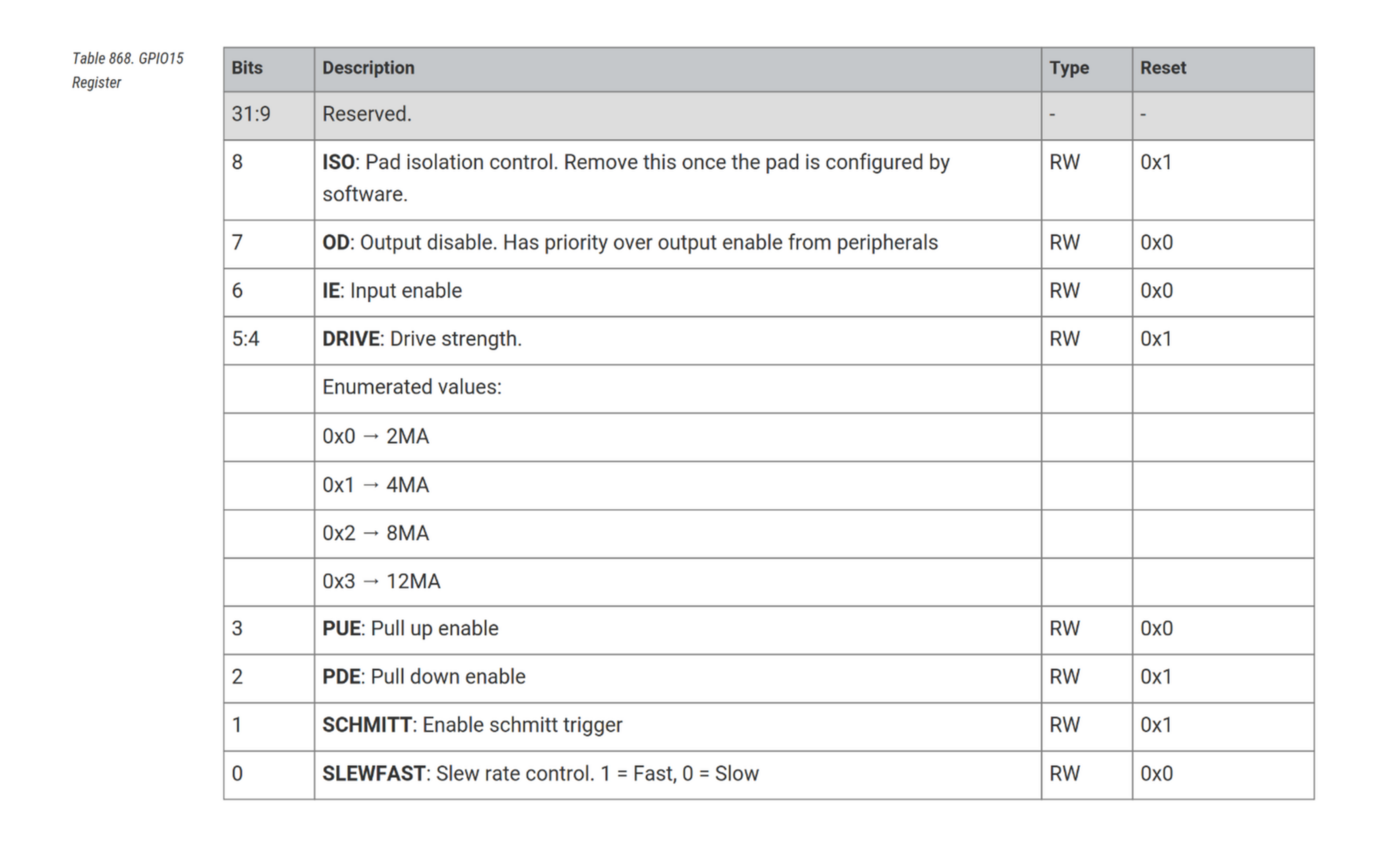
Figure 8. Pad isolation Register (datasheet)
Also interesting in this register could be, among others, the drive strength parameter (2 bit) to set the output current from default ( 0b01) 4 mA to e.g. 12 mA (0b11).
Prepare toggle mask for GPIOx
TASK:
Load the toggle register and set the mask.
As of no big surprise we will also use an atomic approach to toggle the GPIO. At the offset 0x28 of the SIO_BASE we find an atomic XOR register. The exclusive OR is used to set a bit if it was cleared and vis versa, so toggling our output. This comes handy. We have only to set the right bit in the mask by shifting the pin number to the left.
        .equ SIO_BASE,        0xd0000000      # SIO (Single-Cycle I/O) Base Address
        .equ GPIO_OUT_XOR,    SIO_BASE + 0x28 # GPIO output XOR register (atomic)

                li t0, GPIO_OUT_XOR # Load the address of the GPIO_OUT_XOR
                li t1, 1 << PIN_OUT # Load the bit for the output GPIO to be toggled
Every time we store the mask to the register GPIO_OUT_XOR register the pin is toggled. Let’s do this in the main loop.
Around and around "mainloop"
mainloop:       ### MAIN LOOP: Toggle output off GPIOx
                sw t1, 0(t0)        # Set the bit (atomic bit setting-writing)
                j mainloop          # Jump mainloop forever
Let’s think a bit of our measured output frequency of about 2 MHz (Oscilloscop screen of GPIO output (01_toggle.S)). The loop needs half of the period so 500 ns/2 = 250 ns. If we presume one clock cycle per operation, the time of one operation would be 250 ns/2 = 125 ns, resulting in a system clock of 8 MHz (f = 1/T). Let’s add a nop (no operation) instruction that surely needs only one clock cycle and measure again.
| Instr. | Op code meaning | Format | Function | Example | Ext. |
|---|---|---|---|---|---|
|
No Operation (p) |
|
None |
|
I |
mainloop:       # Main Loop: Toggle output on GPIOx
                sw t1, 0(t0)        # Set the bit (atomic bit setting-writing)
                nop                 # Do nothing for 1 cycle
                j mainloop          # Jump mainloop forever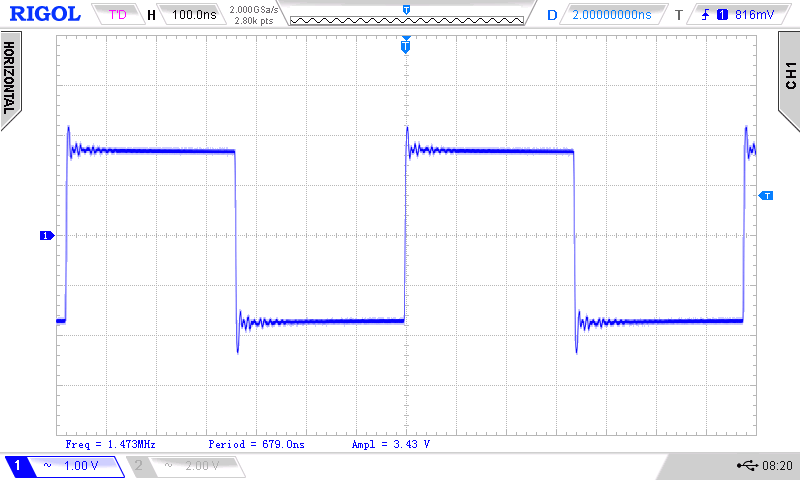
Figure 9. Oscilloscop screenof 01_toggle.S with nop
Now we get about 1.5 MHz, or 333.333 ns per loop revolution. The nop took 333.333 ns-250 ns = 83.333 ns. So the system clock is f = 1/T = 1/83.333 ns = 12 MHz. We we can conclude that one of our two instructions needs two clock cycles (250/80.333 = 3). Let’s double the store instruction to check.
mainloop:       # Main Loop: Toggle output on GPIOx
                sw t1, 0(t0)        # Set the bit (atomic bit setting-writing)
                sw t1, 0(t0)        # Set the bit (atomic bit setting-writing)
                j mainloop          # Jump mainloop forever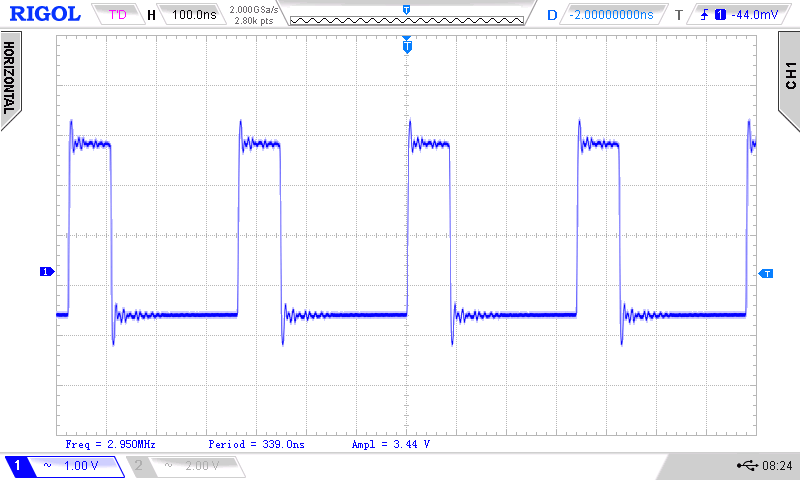
Figure 10. Oscilloscop screen of 01_toggle.S with 2 toggle instructions
The toggle instruction (sw, store word) needs only one clock cycle!
Conclusion:
Our clock frequency is about 12 MHz. One cycle is 83.333 ns long. If we look at the Pico2 we see a 12 MHz crystal. So that’s a good sign. We can conclude that our normal mainloop needs 3 clock cycles to run. As the store instruction only needs one cycle, the jump needs 2 cycles. I also tried a short jump (jal) with the same result.
Later we will us a system clock of 150 MHz. So the maximum toggle frequency with this program can be 150 MHz/3/2 = 30 MHz.
Countercheck:
To countercheck our findings, we can look in the datasheet (3.8.7. Instruction cycle counts). Here we see that most instructions need only one clock cycle. So do sw and addi. Interestingly we read that nop is a pseudo-opcode for addi x0, x0, 0. We also see no j or ret. Both are pseudo instructions using the jal instruction (jal zero, offset and jal zero , 0(ra)). And the jal instruction needs 2 clock cycles!
The jal instruction has a very interesting footnote (1):
A jump or branch to a 32-bit instruction that isn’t 32-bit-aligned requires one additional cycle because two naturally aligned bus cycles are required to fetch the target instruction.
— 3.8.7.9. Table footnotes (RP2350 datasheet)
And that is a whole chapter of its own with an elephant in chapter 2.2 (The elephant in the room).
And if we have no oscilloscope
We need to slow down the toggling by using a delay loop. As 12 MHz is pretty fast we can’t add only some nop instructions into the loop to slow everything down. Our eye is slow, so the frequency need to be under 25 Hz. So we create a delay in a subroutine and call it from the mainloop.
TASK:
Load a counter with a big number, enter a loop and decrement the counter to zero. Do it in a subroutine.
We use the argument register a0 to pass the number that is decremented to zero. The instruction jal calls the subroutine and saves the return address in the ABI register ra. The return instruction (ret) uses this register to get back to mainloop.
         ### Global constants
        .equ DELAY_NR,        1000000       # 1000000 gives us ~ 2 Hz (12MHz clock)

mainloop:       ### MAIN LOOP: Toggle output off GPIOx
                sw t1, 0(t0)        # Set the bit (atomic bit setting-writing)
                li a0, DELAY_NR     # Set counter for delay loop (parameter a0)
                jal delay           # Jump and link delay
                j mainloop          # Jump mainloop forever

delay:          # Subroutine delay (parameter a0)
                addi a0, a0, -1     # Decrement a0
                bnez a0, delay      # Stay in loop until counter = 0
ret| Instr. | Op code meaning | Format | Function | Example | Ext. |
|---|---|---|---|---|---|
|
Jump And Link (p) |
|
ra ← pc+4; pc ← addr |
|
I |
|
Add Immediate |
|
rd ← rs1 + i12 |
|
I |
|
Branch Not Equal Zero (p) |
|
if (rs != 0) pc ← addr |
|
I |
|
RETurn from subroutine (p) |
|
pc ← ra |
|
I |
Explanations and remarks:
-
The big number was was determined through trial and error. With one million we get approximately 2 Hz.
-
According to the RISC-V
ABI(Application binary interface), the argument registers should be used for parameter passing to subroutines. So we usea0for passing the big number to thedelaysubroutine. This register is also our counter register that is decremented to zero. -
The pseudo-instruction
jalis used for subroutine calls. The offset is calculated by the Assembler. After a program counter (PC) relative jump to a labeljallinks a call by storing the address of the next instruction (PC+4) into a designated register, typicallyra. Theraregister should be named "link address" la, but for good old times sake, we stick with "return address". -
There is no decrement instruction, so we decrement the counter register by adding
-1. -
The pseudo-instruction
bnezjumps back to ourdelaylabel as long as the counter register is not zero. -
When we return from our delay subroutine,
retknows where we have to return (next instruction afterjal) by looking at theraregister.
The frequency of our LED blink is 2 MHz, so the delay loop takes 250 ms/1000000 = 250 ns. That are 250 ns/83.333 ns = 3 clock cycles. If we countercheck in the RP2350 datasheet (3.8.7. Instruction cycle counts) we see that the branch can use one or two cycles. Here it takes 2 cycles.
Assemble, link, and program
Let’s look shortly at the things we have done to get the binary and program it into the RP2350.
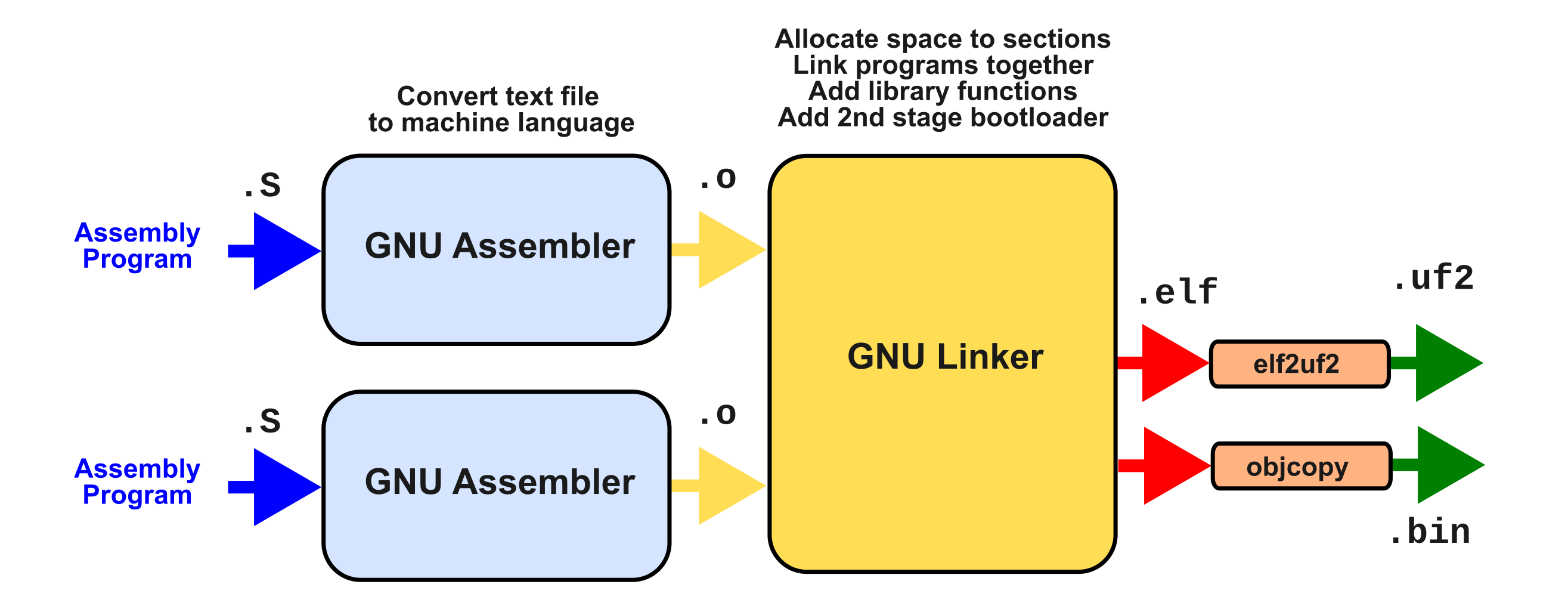
Figure 11. Assembler and Linker
In our project we have only one assembly file and no libraries. We don’t need a .bin or .uf2 file because OpenOCD uses the .elf file to program.
NOTE
If you want to create an .uf2 file you can do this with picotool. This replaces the older elf2uf2 program. Install picotool from here: https://github.com/raspberrypi/picotool and use this command inside the project folder:
picotool uf2 convert 01_toggle.elf 01_toggle.uf2
Assembling
First we used the GCC Assembler GAS to create an object file:
riscv32-pico-elf-as -g -march=rv32imac -mabi=ilp32 -o 01_toggle/01_toggle.o 01_toggle/01_toggle.SWe passed some arguments to the command riscv32-pico-elf-as.
-
-gis important if we want to debug with GDB because this argument adds debug information to the object file. -
-march=rv32imac:
-march=selects the architecture to target, telling the compiler witch instructions and registers are available. We selectRV32IMAC.
RV32Istands for a load-store ISA with 32-bit general-purpose integer registers.
Mstands for Integer Multiplication and Division
Afor Atomic Instructions and
Cfor Compressed Instructions. -
-mabi=ilp32:
-mabi=selects the ABI. This controls which arguments are passed in which registers and the layout of data in memory. We selectilp32. Integer, Long, and Pointers are all 32-bits long. -
-ospecifies the output file (ending.ofor object).
What is this object file?
The object file is an ELF file. ELF stands for Executable and Linkable Format and is the standard binary file format for executables, object code, shared libraries, and core dumps on Linux and many other Unix-like operating systems.
The key features of an ELF file is Portability across different hardware architectures, Sections (Chapter 1.1), Headers that describe the file’s structure (including entry point, section headers, and program headers) and Linking as ELF files are used as input to the linker (ld) to produce final executables or shared libraries.
With the help of GCC objdump we can look at the file. -d stands for disassemble (display Assembler contents), -t displays the contents of the symbol table(s) and -r displays the relocation entries in the file. With a pipe (>) we redirect the output in a text file. Create the object file with:
cd ~/pi_pico2/pico2_riscv_ass/01_toggle
riscv32-pico-elf-objdump -d -t -r 01_toggle.o > obj_dump_01_toggle_o.txt01_toggle.o: file format elf32-littleriscv
SYMBOL TABLE:
00000000 l d .text 00000000 .text
00000000 l d .data 00000000 .data
00000000 l d .bss 00000000 .bss
0000000f l *ABS* 00000000 PIN_OUT
000f4240 l *ABS* 00000000 DELAY_NR
0000007c l *ABS* 00000000 GPIO_OFFSET
00000040 l *ABS* 00000000 PADS_OFFSET
00003000 l *ABS* 00000000 A_CLR
00000005 l *ABS* 00000000 GPIO_CTRL_FUNCT_SIO
00000008 l *ABS* 00000000 PAD_ISO_BIT
40028000 l *ABS* 00000000 IO_BANK0_BASE
d0000000 l *ABS* 00000000 SIO_BASE
40038000 l *ABS* 00000000 PADS_BANK0_BASE
4002807c l *ABS* 00000000 GPIO_CTRL
d0000028 l *ABS* 00000000 GPIO_OUT_XOR
d0000038 l *ABS* 00000000 GPIO_OE_SET
4003b040 l *ABS* 00000000 PAD_CLR
00000036 l .text 00000000 setup
00000076 l .text 00000000 mainloop
0000007c l .text 00000000 delay
00000000 l d .debug_info 00000000 .debug_info
00000000 l d .debug_abbrev 00000000 .debug_abbrev
00000000 l d .debug_line 00000000 .debug_line
00000000 l d .debug_aranges 00000000 .debug_aranges
00000000 l d .debug_str 00000000 .debug_str
00000000 l d .riscv.attributes 00000000 .riscv.attributes
00000026 g .text 00000000 _start
00000000 *UND* 00000000 __stack_top
00000036 g .text 00000000 main
Disassembly of section .text:
00000000 <_start-0x26>:
0: 0001 nop
0: R_RISCV_ALIGN *ABS*+0x6
2: 00000013 nop
6: ffffded3 .word 0xffffded3
a: 11010142 .word 0x11010142
e: 00000344 .word 0x00000344
...
12: R_RISCV_32 _start
16: R_RISCV_32 __stack_top
1a: 000004ff .word 0x000004ff
1e: 00000000 .word 0x00000000
22: ab123579 .word 0xab123579
00000026 <_start>:
26: 00000117 auipc sp,0x0
26: R_RISCV_PCREL_HI20 __stack_top
26: R_RISCV_RELAX *ABS*
2a: 00010113 mv sp,sp
2a: R_RISCV_PCREL_LO12_I .L0
2a: R_RISCV_RELAX *ABS*
2e: 2021 jal 36 <main>
2e: R_RISCV_RVC_JUMP main
30: 10500073 wfi
34: bfcd j 26 <_start>
34: R_RISCV_RVC_JUMP _start
00000036 <main>:
36: 400282b7 lui t0,0x40028
3a: 07c28293 addi t0,t0,124 # 4002807c <GPIO_CTRL>
3e: 0002a303 lw t1,0(t0)
42: fe037313 andi t1,t1,-32
46: 00536313 ori t1,t1,5
4a: 0062a023 sw t1,0(t0)
4e: d00002b7 lui t0,0xd0000
52: 03828293 addi t0,t0,56 # d0000038 <GPIO_OE_SET>
56: 6321 lui t1,0x8
58: 0062a023 sw t1,0(t0)
5c: 4003b2b7 lui t0,0x4003b
60: 04028293 addi t0,t0,64 # 4003b040 <PAD_CLR>
64: 10000313 li t1,256
68: 0062a023 sw t1,0(t0)
6c: d00002b7 lui t0,0xd0000
70: 02828293 addi t0,t0,40 # d0000028 <GPIO_OUT_XOR>
74: 6321 lui t1,0x8
00000076 <mainloop>:
76: 0062a023 sw t1,0(t0)
7a: bff5 j 76 <mainloop>
7a: R_RISCV_RVC_JUMP mainloop
0000007c <delay>:
7c: 157d addi a0,a0,-1
7e: fd7d bnez a0,7c <delay>
7e: R_RISCV_RVC_BRANCH delay
80: 8082 ret
82: 0001 nop
84: 00000013 nopWe see some interesting things in this file.
-
Some of our instructions are pseudo instructions e.g.
li(load immediate).liis replaced by the two real instructionslui(load upper immediate) andaddi(add immediate).lishould load a 32-bit constant into a register but insteadlui(load upper immediate) loads the upper 20-bit immediate (unsigned), andaddiadds the lower 12-bit immediate. -
Some instructions are compressed to 2 byte (16 bit). And this can give us trouble.
-
Debug information is added.
-
We also see some relocation information needed by the linker.
| Instr. | Op code meaning | Format | Function | Example | Ext. |
|---|---|---|---|---|---|
|
Load Upper Immediate |
|
rd ← i20 << 12 |
|
I |
Linking
The Linker (ld) combines one or more object files (and libraries) into a single executable or library. The linker performs the following tasks:
-
Symbol Resolution:
It resolves references between object files (e.g. function calls, global variables). -
Section merging:
It combines sections with the same name (e.g. all .text sections are merged into one). -
Address assignment:
It assigns virtual memory addresses to sections and symbols. -
Relocation:
It adjusts addresses in the code and data to match the final layout of the executable. -
Output generation:
It produces the final executable or library (e.g.a.outor a shared library.so).
The linker needs a linker file (linker_min.ld) with some information. We use the following minimal linker script:
/* Minimal linker script for RISC-V multi-core by weigu.lu */
OUTPUT_ARCH(riscv)
ENTRY(_start)

MEMORY {
    FLASH (rx)  : ORIGIN = 0x10000000, LENGTH = 4M    /* FLASH read-only */
    RAM   (rwx) : ORIGIN = 0x20000000, LENGTH = 512k  /* SRAM read/write */
}

/* Sections */
SECTIONS {
    .text : ALIGN(4) {
        *(.text*)
    } > FLASH
    .rodata : ALIGN(4) {
        *(.rodata*)
    } > FLASH
    .data : ALIGN(4) {
        *(.data*)
    } > RAM AT > FLASH
    .bss : ALIGN(4) {
        *(.bss*)
    } > RAM
}

/* RAM boundaries */
__stack_top = ORIGIN(RAM) + LENGTH(RAM);
First we specify the output and the entry point (e.g., _start for bare-metal).
Then we define the origin and length of FLASH (read only) and RAM (rw). After this we describe how sections are mapped into memory, and finally we reserve memory for the stack and define its top ( __stack_top). More on this in the chapter 10 (Memory and DMA).
The following command does the linking:
riscv32-pico-elf-ld -g -m elf32lriscv -T linker_min.ld -o 01_toggle/01_toggle.elf 01_toggle/01_toggle.oAfter linking we get the .elf file. Let’s take a look at this file:
cd ~/pi_pico2/pico2_riscv_ass/01_toggle
riscv32-pico-elf-objdump -d -t -r 01_toggle.elf > obj_dump_01_toggle_elf.txt01_toggle.elf: file format elf32-littleriscv
SYMBOL TABLE:
10000000 l d .text 00000000 .text
00000000 l d .riscv.attributes 00000000 .riscv.attributes
00000000 l d .debug_line 00000000 .debug_line
00000000 l d .debug_info 00000000 .debug_info
00000000 l d .debug_abbrev 00000000 .debug_abbrev
00000000 l d .debug_aranges 00000000 .debug_aranges
00000000 l d .debug_str 00000000 .debug_str
00000000 l df *ABS* 00000000 01_toggle.o
0000000f l *ABS* 00000000 PIN_OUT
000f4240 l *ABS* 00000000 DELAY_NR
0000007c l *ABS* 00000000 GPIO_OFFSET
00000040 l *ABS* 00000000 PADS_OFFSET
00003000 l *ABS* 00000000 A_CLR
00000005 l *ABS* 00000000 GPIO_CTRL_FUNCT_SIO
00000008 l *ABS* 00000000 PAD_ISO_BIT
40028000 l *ABS* 00000000 IO_BANK0_BASE
d0000000 l *ABS* 00000000 SIO_BASE
40038000 l *ABS* 00000000 PADS_BANK0_BASE
4002807c l *ABS* 00000000 GPIO_CTRL
d0000028 l *ABS* 00000000 GPIO_OUT_XOR
d0000038 l *ABS* 00000000 GPIO_OE_SET
4003b040 l *ABS* 00000000 PAD_CLR
10000030 l .text 00000000 setup
10000070 l .text 00000000 mainloop
10000076 l .text 00000000 delay
20080000 g .text 00000000 __stack_top
10000020 g .text 00000000 _start
10000030 g .text 00000000 main
Disassembly of section .text:
10000000 <_start-0x20>:
10000000: ffffded3 .insn 4, 0xffffded3
10000004: 0142 slli sp,sp,0x10
10000006: 1101 addi sp,sp,-32
10000008: 0344 addi s1,sp,388
1000000a: 0000 unimp
1000000c: 0020 addi s0,sp,8
1000000e: 1000 addi s0,sp,32
10000010: 0000 unimp
10000012: 2008 .insn 2, 0x2008
10000014: 04ff 0000 0000 0000 .insn 10, 0x357900000000000004ff
1000001c: 3579
1000001e: ab12 .insn 2, 0xab12
10000020 <_start>:
10000020: 10080117 auipc sp,0x10080
10000024: fe010113 addi sp,sp,-32 # 20080000 <__stack_top>
10000028: 2021 jal 10000030 <main>
1000002a: 10500073 wfi
1000002e: bfcd j 10000020 <_start>
10000030 <main>:
10000030: 400282b7 lui t0,0x40028
10000034: 07c28293 addi t0,t0,124 # 4002807c <GPIO_CTRL>
10000038: 0002a303 lw t1,0(t0)
1000003c: fe037313 andi t1,t1,-32
10000040: 00536313 ori t1,t1,5
10000044: 0062a023 sw t1,0(t0)
10000048: d00002b7 lui t0,0xd0000
1000004c: 03828293 addi t0,t0,56 # d0000038 <GPIO_OE_SET>
10000050: 6321 lui t1,0x8
10000052: 0062a023 sw t1,0(t0)
10000056: 4003b2b7 lui t0,0x4003b
1000005a: 04028293 addi t0,t0,64 # 4003b040 <PAD_CLR>
1000005e: 10000313 li t1,256
10000062: 0062a023 sw t1,0(t0)
10000066: d00002b7 lui t0,0xd0000
1000006a: 02828293 addi t0,t0,40 # d0000028 <GPIO_OUT_XOR>
1000006e: 6321 lui t1,0x8
10000070 <mainloop>:
10000070: 0062a023 sw t1,0(t0)
10000074: bff5 j 10000070 <mainloop>
10000076 <delay>:
10000076: 157d addi a0,a0,-1
10000078: fd7d bnez a0,10000076 <delay>
1000007a: 8082 ret
1000007c: 0001 nop
1000007e: 00000013 nopThis is shorter, easier to read, and we see all our addresses used in FLASH. The object dump can really help, when analyzing or debugging a program.
Programming
We used OpenOCD to program the Pico2 through our Debug Probe with the following command:
openocd -f interface/cmsis-dap.cfg -f target/rp2350-riscv.cfg \
        -c "adapter speed 5000" \
        -c "program 01_toggle.elf verify reset exit"
The Open On-Chip Debugger is an open-source tool for debugging and programming embedded systems. We use the following parameter:
-
-f interface/cmsis-dap.cfg
specifies the debug interface to use. We load thecmsis-dapconfiguration file, the standard debug interface for ARM Cortex-M and RISC-V devices. The file tells OpenOCD how to communicate with the debug probe. -
-f target/rp2350-riscv.cfg
specifies the target microcontroller (RP2350 with a RISC-V core). The file defines the CPU architecture, memory map, and how to interact with the chip. -
-c "adapter speed 5000"executes a command directly and sets the JTAG/SWD clock speed to 5000 kHz (5 MHz). This controls how fast the debug probe communicates with the target. If you have problems with the connection you can lower this speed. -
-c "program 01_toggle.elf verify reset exit"Here we pass a chain of commands executed in sequence. Program the firmware (01_toggle.elf) into the microcontroller’s flash memory and verify that the firmware was correctly written to flash. Then reset the microcontroller, so the new firmware starts running and close OpenOCD after the operation is complete.
It’s often part of a build script or Makefile for automated testing and deployment.
Final thoughts on chapter 1
Yes we did it! We toggled an LED, but it was not so easy.
The gain of our pain is a very small program. If we create a binary file (not needed here) with:
cd ~/pi_pico2/pico2_riscv_ass/01_toggle
riscv32-pico-elf-objcopy -O binary 01_toggle.elf 01_toggle.bin
we see that we have a binary file that uses 130 byte of memory space! The same program created in C with the SDK takes 6244 byte. That is about 50 times more memory space! If we compare the .elf files (6076 byte vs 392380 byte) we see a similar factor!
We now already know 15 Assembler instructions:
la, call, wfi, j, li, lw, andi, ori, sw, nop, jal, addi, bnez, ret and lui.
We will use some of them all the time. If you want to take already a look at other instructions, check out the appendix C (Instructions).
We have still a lot to cover, and we really need to clean up and make everything more efficient, so let’s go on!
How to reset the pico2 if everything goes wrong
If you are no more able to program the pico or if the clock speed is false we need to reset the chip in its original state. To do so need to power it with pressed bootsel button. This will cause the Pico to appear as a removable drive, where we erase all files on this drive to reset it completely.
Downloads
-
Everything on github: [https://github.com/weigu1/rpi_pico_pio](https://github.com/weigu1/rpi_pico_pio)
Interesting links
http://blog.wolfman.com/articles/2025/5/19/bare-metal-gpio-twiddling-for-risc-v-on-rpi-pico2 https://github.com/wolfmanjm/RISC-V-RP2350-baremetal https://mcyoung.xyz/2021/11/29/assembly-1/ https://smist08.wordpress.com/2024/10/21/risc-v-on-the-raspberry-pi-pico-2/
+ SDK on github: https://github.com/raspberrypi/pico-sdk + SDK: https://datasheets.raspberrypi.com/pico/raspberry-pi-pico-c-sdk.pdf + Datasheet RP2350: https://datasheets.raspberrypi.com/rp2350/rp2350-datasheet.pdf + Getting started with Pico (pdf): https://datasheets.raspberrypi.com/pico/getting-started-with-pico.pdf + Picotool: https://github.com/raspberrypi/picotool
<br> <br>
